

ホーム > 市政情報 > 広報 > 多言語対応について(Multilingual Support) > 広報あこうの多言語対応について(Multilingual Support for Ako's Newsletter-"Kouhou Ako")
ここから本文です。
更新日:2026年1月1日
広報あこうの多言語対応について(Multilingual Support for Ako's Newsletter-"Kouhou Ako")
毎月発行している「広報あこう(PDF版)」は、Google翻訳機能を利用して多言語表示することができます。
多言語表示する方法を以下のとおり紹介しますので参考にしてください。
(利用上の注意)
Google翻訳サービスは翻訳プログラムによる自動翻訳のため、必ずしも正確な翻訳であるとは限りません。レイアウトがくずれたり、翻訳できない箇所がありますのでご了承ください。
Googleの翻訳サービスに関する詳細はGoogle Translate ヘルプセンターを参照ください。
You can use the Google Translate function to display the monthly publication “Ako’s newsletter – Kouho” , (PDF version) in multiple languages.
Please refer to the following method for multilingual translation.
(Precautions for use)
Google‘s translation service provides an automatic translation using a computer program, so it may not necessarily be an accurate translation. Also note that the layout may be distorted or some parts may not be translated properly.
For more information about Google's translation service, please refer to the Google Translate Help Center.
「Google翻訳」PDFファイル翻訳の使い方(How to use "Google Translate" on PDF Files)
1.PDFファイルをデバイスにインストールする(Download the PDF file to your device)
デバイスから赤穂市公式ホームページの「広報あこう」のページにアクセスし、見たい広報あこうを選び、パソコン上にPDFファイルとしてダウンロードしておきます。
Access the “広報あこう” Ako’s Newsletter – Kouhou Ako on the Ako City Hall official homepage from your device and select the newsletter you want to read and download it to your device as a PDF file.
2.「Google翻訳」にアクセスする(Access "Google Translate")
デバイスでGoogle 翻訳(https://translate.google.com/)にアクセスします。
Access the Google Translate website (https://translate.google.com/) on your device.
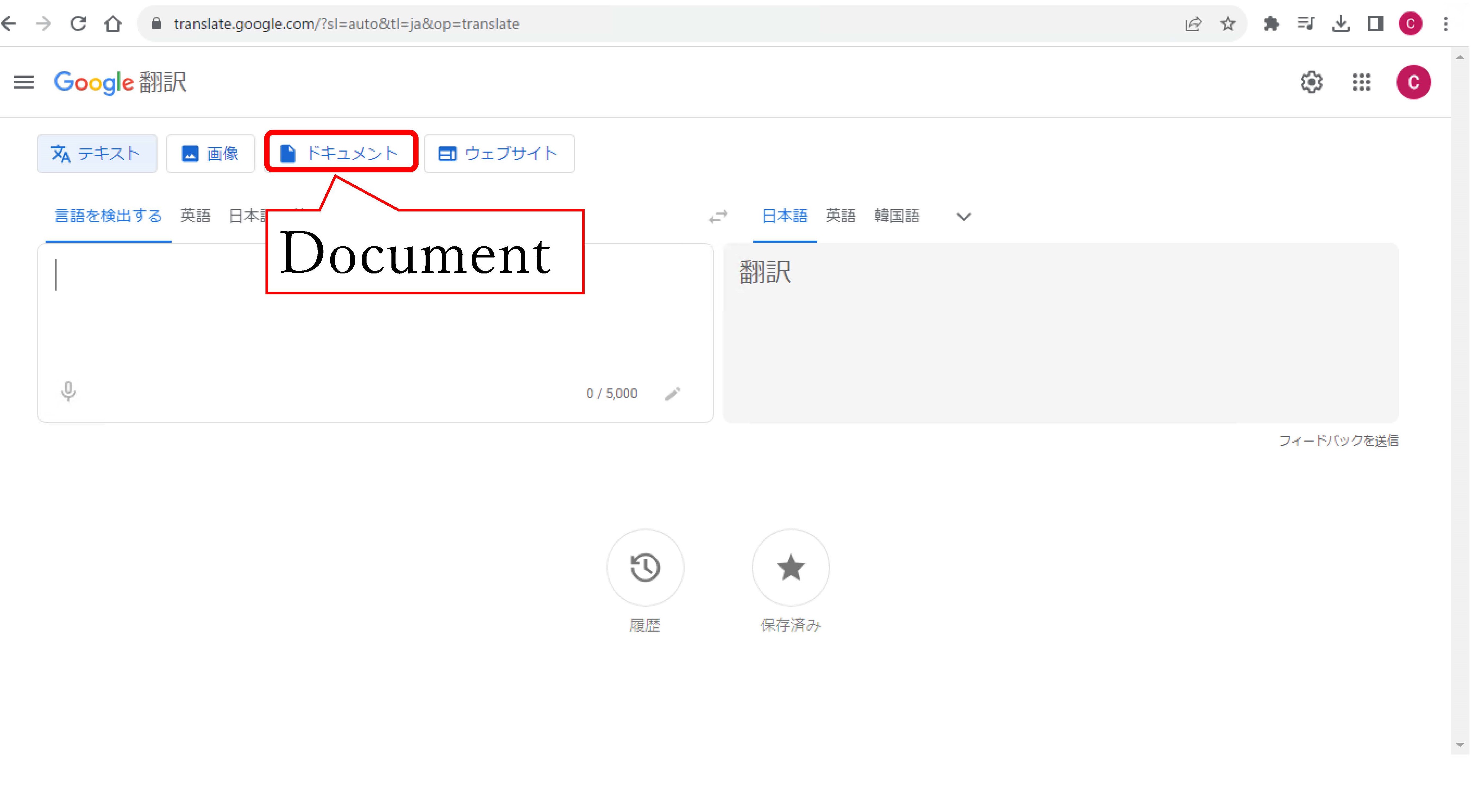
画面左上の【ドキュメント】をクリックします。
Click [Document] at the top left of the page.
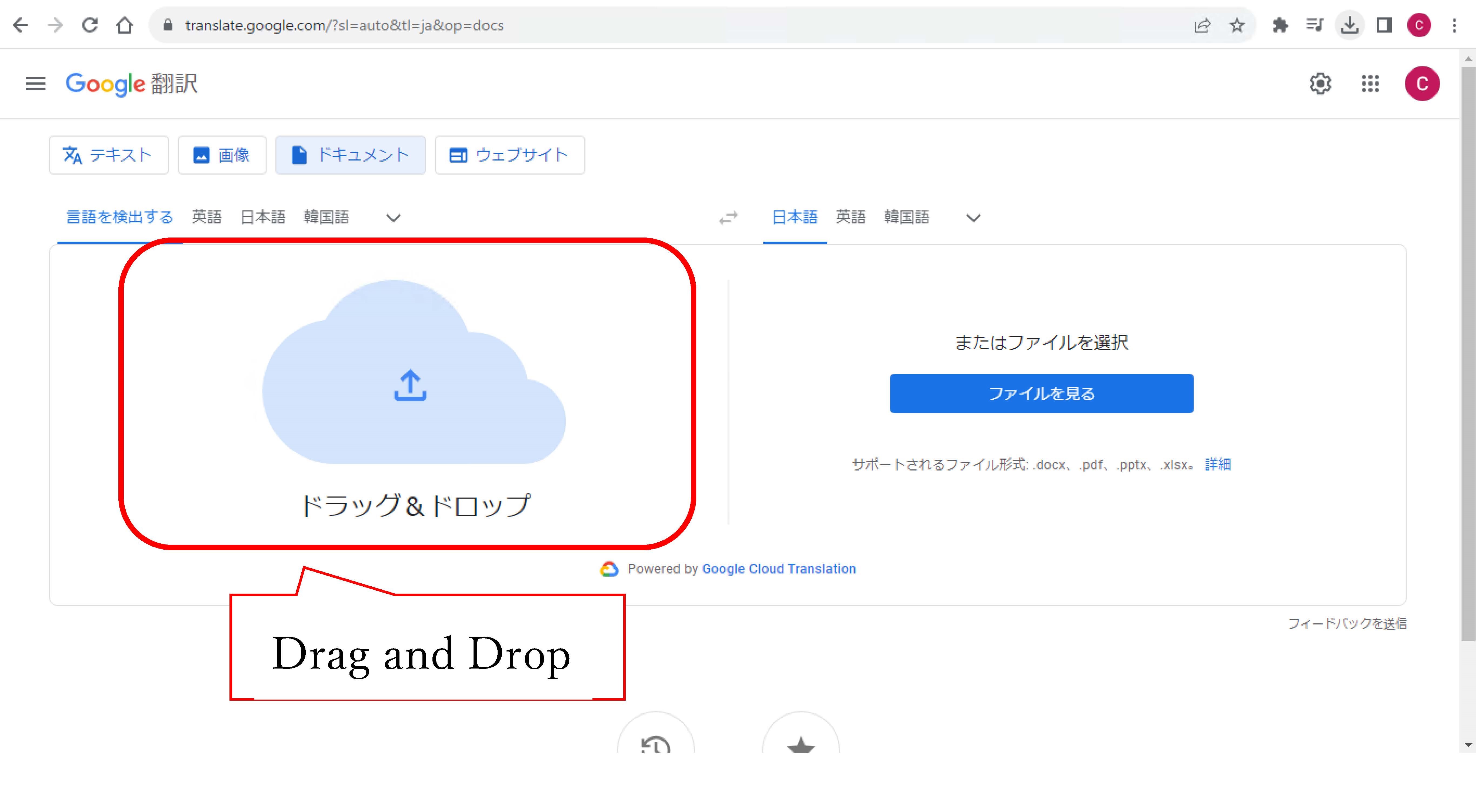
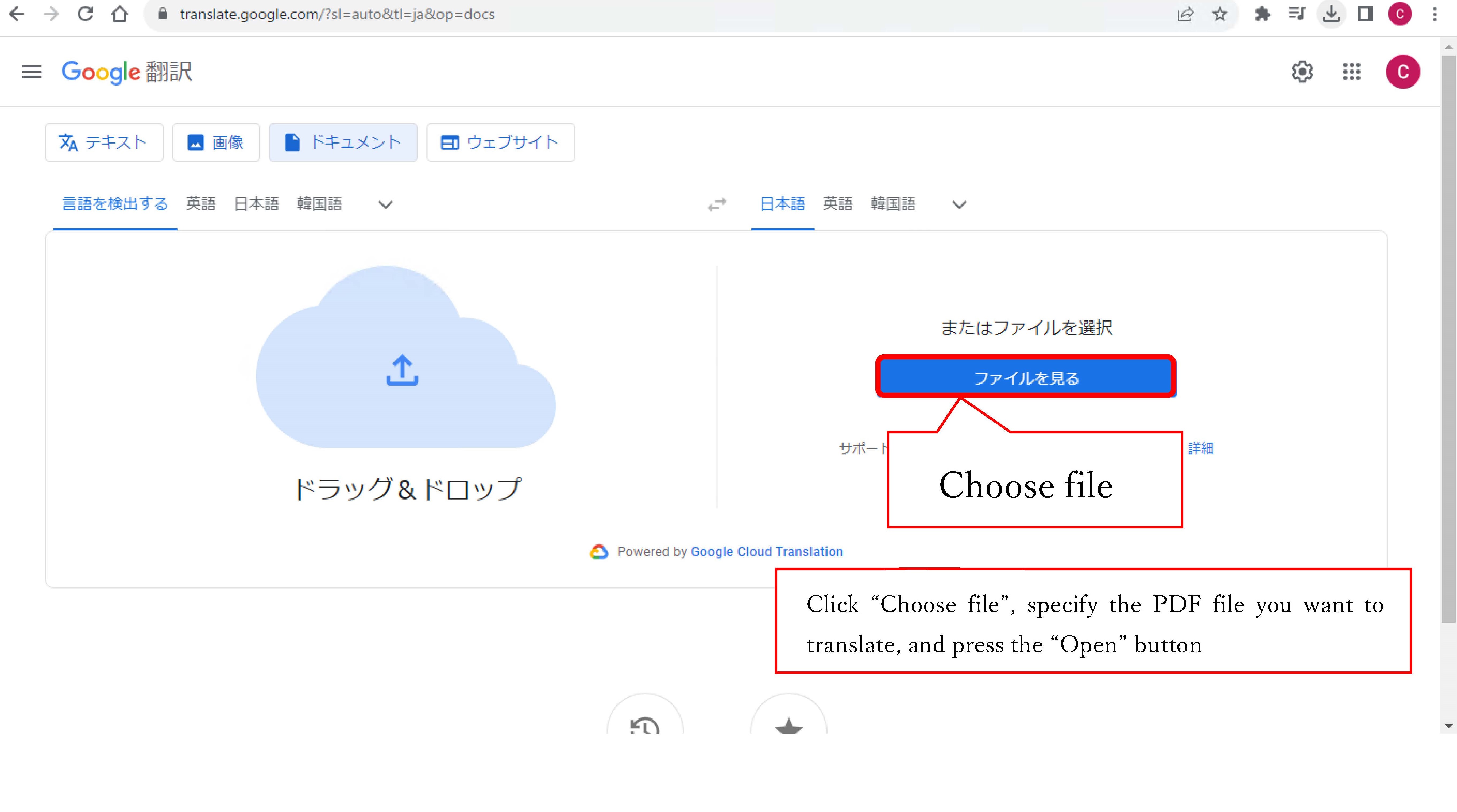
3.翻訳したいPDFファイルを「ドラッグ&ドロップ」または「ファイルを見る」を押し、翻訳したいPDFファイルを指定し、「開く」ボタンを押す(“Drag and drop” the PDF file you want to translate, or click “View file”, specify the PDF file and press the “Open” button)
- Drag and drop
- View file
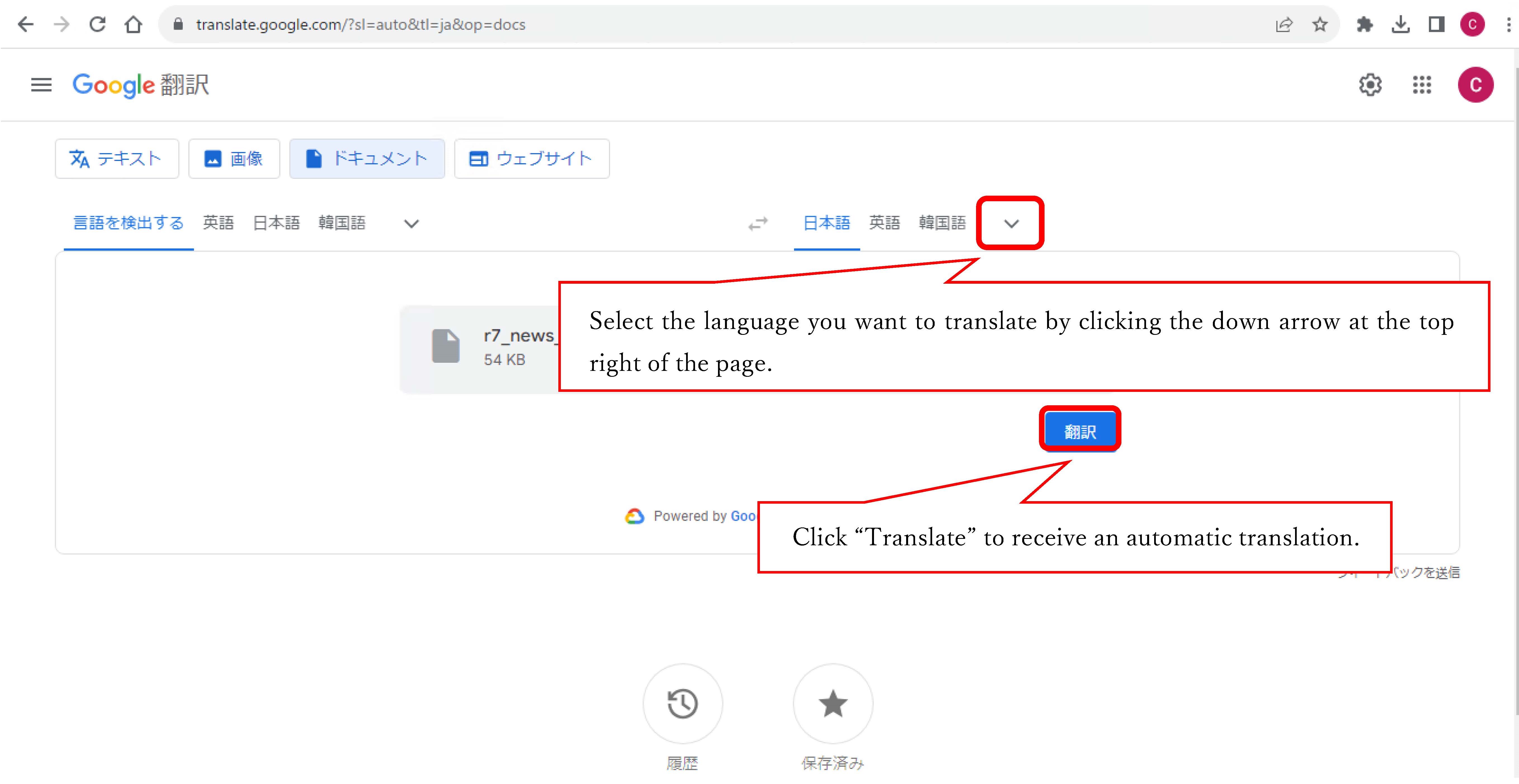
4.翻訳したい言語を選択し、「翻訳」ボタンを押す(Select the language you want to translate and click “Translate”)
- 翻訳先の言語は、画面右上の下矢印をクリックして選択します。どの言語に翻訳したいか選んでください。
Select the language you want to translate by clicking the down arrow at the top right of the page and choose your preferred language.
- 「翻訳」をクリックすると自動翻訳が開始されます。
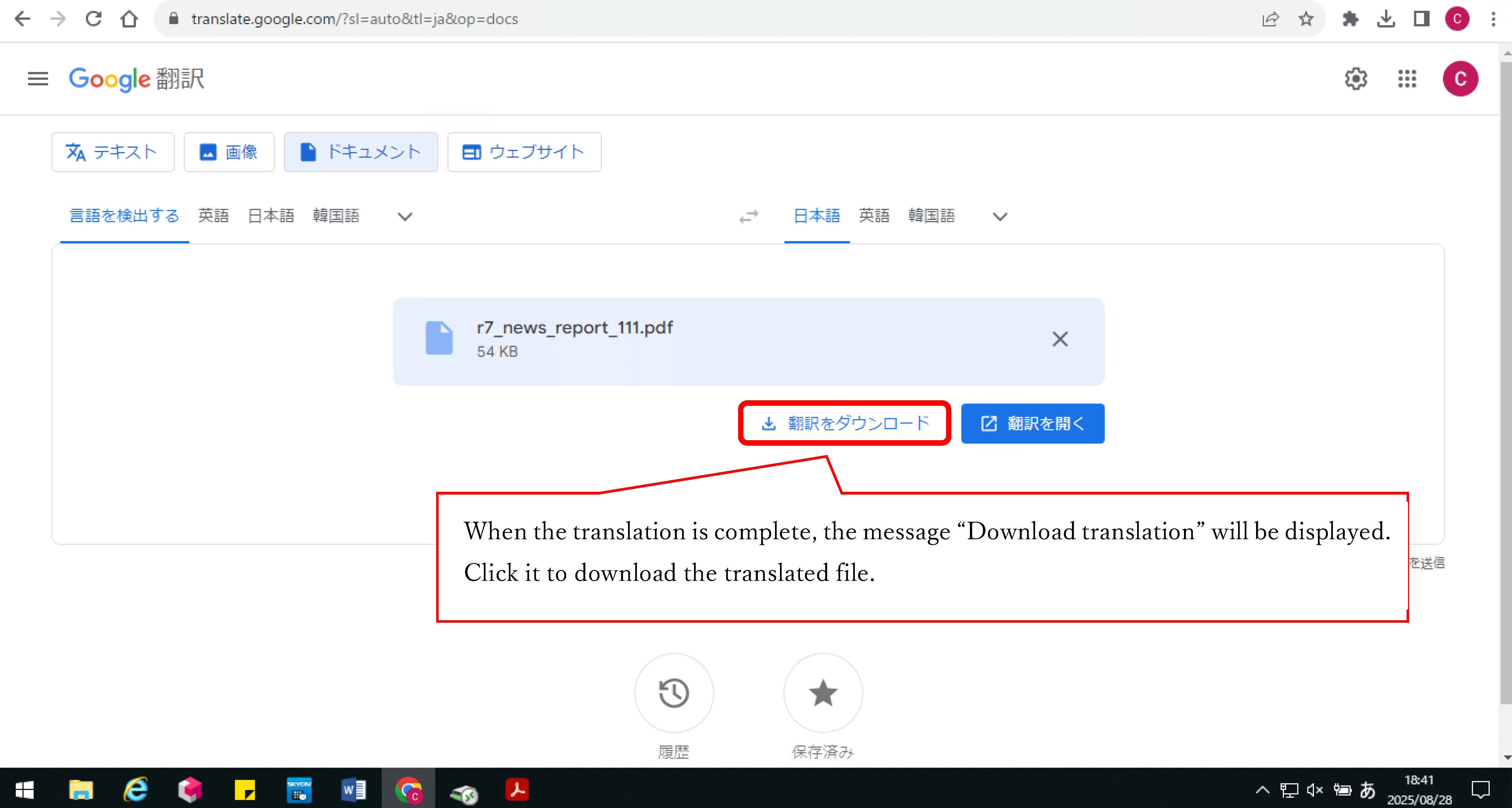
When the translation is complete, the message“Download translation”will be displayed. Click it to download the translated file.
5.翻訳が完了したら「翻訳をダウンロード」と表示されるので、パソコンへダウンロードして保存する(When the translation is complete, “Download translation”will be displayed. You can click and save it to your computer)
翻訳が完了したら「翻訳をダウンロード」と表示されるので、クリックをして、翻訳されたファイルをダウンロードして完了です。
When the translation is complete, the message“Download translation”will be displayed. Click it to download the translated file.
パソコンに保存したデータが指定した言語に翻訳されていますのでご覧ください
(Check the translated PDF file on your computer)
お問い合わせ